Hex vs RGB: What Is the Difference Between These Two Color Formats?
Hex and RGB are two representations of the same underlying color model — sRGB. They encode identical information: how much red, green, and blue light to mix for a given color. The difference is purely notational.
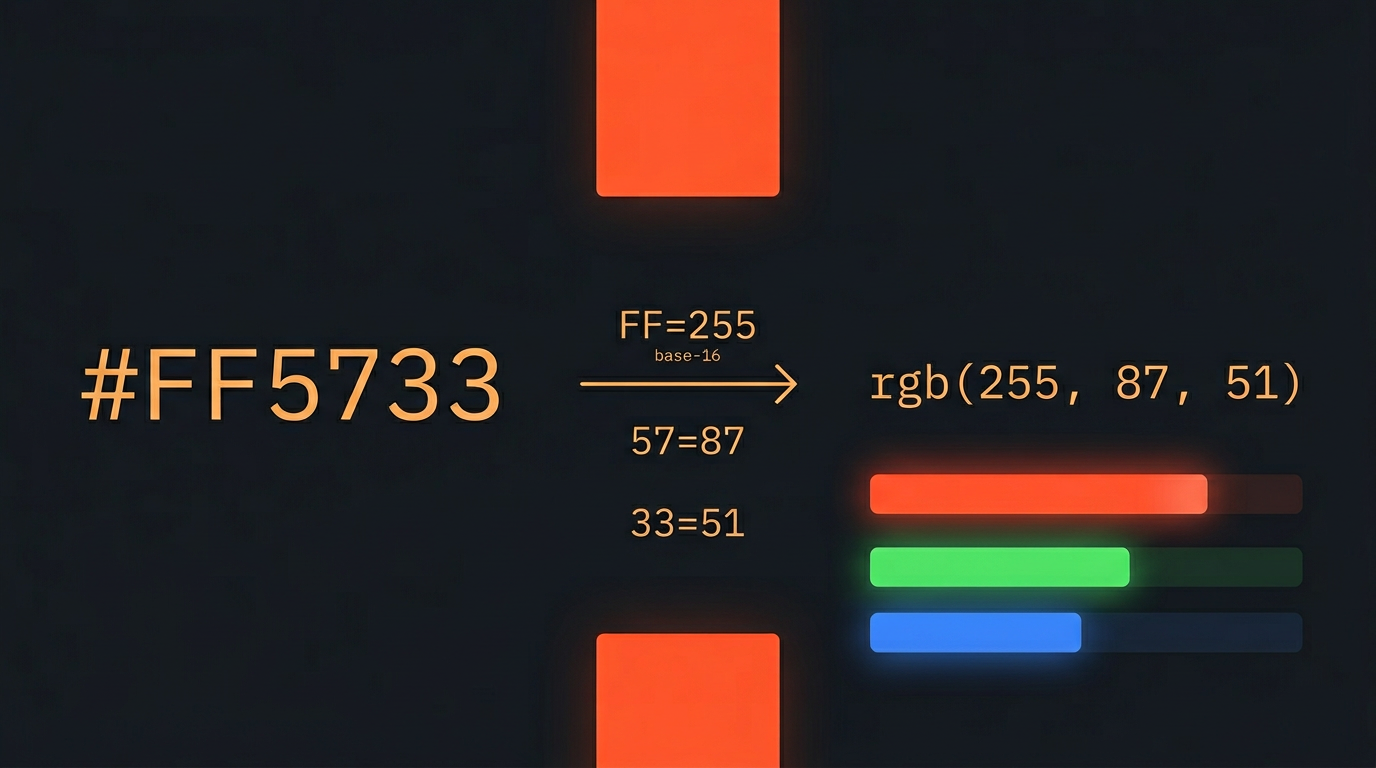
Hexadecimal (hex) uses base-16 notation. The six-digit code #FF5733 breaks into three two-digit pairs: FF (red), 57 (green), 33 (blue). Each pair encodes a value from 0 to 255 using the digits 0–9 and letters A–F. The format was standardized in HTML 3.2 (1996) and remains the default in every design tool — Figma, Sketch, Adobe XD, and Photoshop all export colors as hex by default.
RGB expresses the same three channels as plain decimal numbers: rgb(255, 87, 51). The values range from 0 to 255 for each channel. It is more readable for humans doing arithmetic ("I want 50% red, so R: 127") and is the format expected by most JavaScript APIs, Canvas operations, and image-processing libraries.
Why are both formats still in use rather than one winning? Hex is 2.5x more compact: #FF5733 is 7 characters vs rgb(255, 87, 51) at 18 characters. That compactness matters in HTML attributes, CSS files, and design specs where colors appear hundreds of times. RGB wins when you need to compute with the numbers — adding opacity, interpolating between two colors, or running a contrast calculation all require decimal arithmetic that hex makes awkward.
How to Convert Hex to RGB Online (Step by Step)
The DevToolsPro.org Color Picker & Converter converts between HEX, RGB, HSL, and HSV instantly — no signup, no server, everything runs in your browser.
Step 1: Open the Color Converter
Go to devtoolspro.org/color-picker. You will see a live color preview alongside input fields for HEX, RGB, HSL, and HSV. All four formats update simultaneously as you type into any one of them.
Step 2: Enter Your Hex Code
Click into the HEX field and type your color code — with or without the leading #. The tool accepts all hex formats: 3-digit (F53), 6-digit (FF5733), and 8-digit with alpha (FF573380).
Step 3: Read the RGB Values
The RGB field updates immediately, showing the full rgb(R, G, B) notation. For #FF5733 you get rgb(255, 87, 51). Copy the individual channel values from the display — or copy the full CSS-ready rgb() string with one click.
Step 4: Use the Color Picker for Exploration
If you do not have a specific hex code but want to find the RGB values for a color you can see on screen, use the built-in color picker input. Drag to your target color — all four format fields update in real time. This is useful when you are matching a color from a screenshot or mockup.
When to Use an Online Converter vs Code
The online tool is the right choice for: one-off conversions during design review, checking a client's brand color against a CSS spec, quickly generating the RGB equivalent before writing a utility function, and converting colors in environments where you cannot run a script. For converting colors in bulk or at runtime in production code, use the language-native approaches in Section 5.
How to Convert Hex to RGB Manually: The Math Behind the Conversion
Why Hexadecimal?
Each color channel (red, green, blue) holds a value from 0 to 255. That is exactly 256 values — one byte (8 bits, 28 = 256). One byte conveniently encodes as exactly two hexadecimal digits: 162 = 256. So 00 in hex = 0 in decimal, and FF in hex = 255 in decimal. The two-digit representation is compact and unambiguous — no decimal point, no comma, just six characters for a full color.
The hex digits beyond 9 use letters: A = 10, B = 11, C = 12, D = 13, E = 14, F = 15. So the maximum value FF = (15 × 16) + 15 = 240 + 15 = 255.
Converting #FF5733 to rgb(255, 87, 51)
Split the hex code into three pairs and convert each to decimal:
#FF5733

Red:   FF  =  (F×16) + F  =  (15×16) + 15  =  240 + 15  =  255
Green: 57  =  (5×16) + 7  =  80 + 7           =  87
Blue:  33  =  (3×16) + 3  =  48 + 3           =  51

Result: rgb(255, 87, 51)
The Mental Shortcut for Common Values
With a little practice you can estimate hex values at a glance. The first digit scales by 16; the second adds 0–15. Some anchors worth memorising:
00= 0 (none of this channel)80= 128 (roughly half — actually 8×16 = 128)C0= 192 (12×16 = 192 — 75% brightness)FF= 255 (full intensity)66= 102,99= 153,CC= 204 (the classic web-safe palette values)
Converting RGB Back to Hex
The reverse: take each decimal value, divide by 16 to get the first digit, take the remainder as the second digit. Or use JavaScript's Number.toString(16):
// rgb(255, 87, 51) to hex
(255).toString(16).toUpperCase()  // "FF"
(87).toString(16).toUpperCase()   // "57"
(51).toString(16).toUpperCase()   // "33"

// Result: #FF5733

// Important: single-digit values need zero-padding
(9).toString(16)  // "9" -- wrong in a hex pair, should be "09"
(9).toString(16).padStart(2, "0")  // "09" -- correct
The padStart(2, "0") step is the most common source of bugs in hand-rolled hex converters. A channel value of 9 should produce 09, not 9 — without padding, #FF0933 would silently become #FF933, a completely different (and invalid) color.
Every Hex Format Explained: 3-Digit, 4-Digit, 6-Digit, and 8-Digit Codes
Hex colors come in four lengths. Most designers know the 6-digit standard; fewer know the shorthand rules and the 8-digit opacity format that modern CSS fully supports.
6-Digit Hex: The Standard (#RRGGBB)
The canonical form. Two hex digits per channel, three channels, seven characters including the #. #FF5733, #1A1A2E, #FFFFFF. This is what every design tool exports by default and what all CSS engines have supported since 1996.
3-Digit Shorthand: #RGB → #RRGGBB
When both hex digits in each pair are identical, the pair can be written as a single digit. The browser doubles it on expansion. This only applies when the repeated digit rule holds for all three channels.
#F53   →  #FF5533  (not #FF5733 — each digit doubles)
#09F   →  #0099FF
#FFF   →  #FFFFFF  (white)
#000   →  #000000  (black)
#888   →  #888888  (mid-gray)

#FF5733 CANNOT be shortened  (green pair is 5,7 — digits differ, so no shorthand)
Practical rule: shorthand only applies to colors where each channel is a repeated digit: #RRGGBB where R1=R2, G1=G2, B1=B2. Grays always shorten (#111, #CCC); most brand colors do not.
8-Digit Hex: #RRGGBBAA (Opacity)
CSS Color Level 4 (fully supported in all modern browsers as of 2019) adds two more digits for the alpha channel. The last two digits encode opacity from 00 (fully transparent) to FF (fully opaque).
#FF5733FF   →  rgb(255, 87, 51) at 100% opacity  (same as #FF5733)
#FF573380   →  rgba(255, 87, 51, 0.502)         (50% opacity)
#FF573300   →  rgba(255, 87, 51, 0)              (fully transparent)
The alpha-to-hex calculation: multiply the opacity fraction by 255, round to the nearest integer, then convert to hex. So 50% opacity = 0.5 × 255 = 127.5 ≈ 128 = 0x80.
Alpha Hex Reference Table
Opacity   Decimal   Hex
 100%       255      FF
  95%       242      F2
  90%       230      E6  (some tools show E5 due to truncation)
  80%       204      CC
  75%       191      BF
  70%       179      B3
  60%       153      99
  50%       128      80
  40%       102      66
  30%        77      4D  (some tools show 4C due to truncation)
  25%        64      40
  20%        51      33
  10%        26      1A
   5%        13      0D
   0%         0      00
4-Digit Shorthand: #RGBA
The shorthand rule extends to the alpha channel: #F53A expands to #FF5533AA. In practice this is rare — you need a semi-transparent color where all channel pairs happen to be doubled digits. Useful for quick prototyping in CSS but not common in production design systems.
Browser Support Note
8-digit hex and 4-digit hex are supported in Chrome 62+, Firefox 49+, Safari 10+, and Edge 79+. Internet Explorer does not support them. If you still need IE11 support (rare in 2026 but not impossible in enterprise contexts), use rgba() syntax instead.
Convert Hex to RGB in Code: JavaScript, Python, and CSS
JavaScript: A Robust Converter That Handles All Hex Variants
Most online snippets only handle 6-digit hex. The function below handles 3-digit, 4-digit, 6-digit, and 8-digit formats, with or without the # prefix:
/**
 * Converts any valid hex color to an RGBA object.
 * Handles: #RGB, #RGBA, #RRGGBB, #RRGGBBAA (with or without #)
 */
function hexToRgba(hex) {
  // Strip leading # if present
  const clean = hex.replace(/^#/, "");

  // Expand shorthand: #RGB -> #RRGGBB, #RGBA -> #RRGGBBAA
  const expanded =
    clean.length === 3 || clean.length === 4
      ? clean.split("").map((c) => c + c).join("")
      : clean;

  if (expanded.length !== 6 && expanded.length !== 8) {
    throw new Error("Invalid hex color: " + hex);
  }

  return {
    r: parseInt(expanded.slice(0, 2), 16),
    g: parseInt(expanded.slice(2, 4), 16),
    b: parseInt(expanded.slice(4, 6), 16),
    a: expanded.length === 8
      ? Math.round((parseInt(expanded.slice(6, 8), 16) / 255) * 100) / 100
      : 1,
  };
}

// Usage
hexToRgba("#FF5733");    // { r: 255, g: 87, b: 51, a: 1 }
hexToRgba("#F53");       // { r: 255, g: 85, b: 51, a: 1 }  (expands #FF5533)
hexToRgba("#FF573380");  // { r: 255, g: 87, b: 51, a: 0.5 }
hexToRgba("1A1A2E");     // { r: 26, g: 26, b: 46, a: 1 }   (no # needed)
JavaScript: RGB Back to Hex
function rgbToHex(r, g, b) {
  return "#" + [r, g, b]
    .map((v) => Math.min(255, Math.max(0, Math.round(v)))
      .toString(16)
      .padStart(2, "0"))
    .join("")
    .toUpperCase();
}

function rgbaToHex(r, g, b, a = 1) {
  const alphaHex = Math.round(a * 255).toString(16).padStart(2, "0");
  return rgbToHex(r, g, b) + alphaHex.toUpperCase();
}

rgbToHex(255, 87, 51);       // "#FF5733"
rgbaToHex(255, 87, 51, 0.5); // "#FF573380"
The Math.min(255, Math.max(0, Math.round(v))) clamp prevents values outside the 0–255 range from producing invalid hex, which happens when interpolating between colors or applying arithmetic to channel values.
Python
def hex_to_rgb(hex_color: str) -> tuple[int, int, int]:
    """Convert #RRGGBB or #RGB to (R, G, B). Strips leading #."""
    h = hex_color.lstrip("#")
    if len(h) == 3:
        h = "".join(c * 2 for c in h)  # expand shorthand
    return tuple(int(h[i:i+2], 16) for i in (0, 2, 4))

def rgb_to_hex(r: int, g: int, b: int) -> str:
    return "#{:02X}{:02X}{:02X}".format(r, g, b)

hex_to_rgb("#FF5733")   # (255, 87, 51)
hex_to_rgb("#F53")      # (255, 85, 51)
rgb_to_hex(255, 87, 51) # "#FF5733"
CSS: The color-mix() Alternative
In modern CSS (Chrome 111+, Firefox 113+, Safari 16.2+) you do not always need to convert to RGB to achieve transparency — color-mix() can blend any color with transparent:
/* 50% opacity of your brand color without touching the hex code */
background: color-mix(in srgb, #FF5733 50%, transparent);

/* Cross-browser with fallback */
background: rgba(255, 87, 51, 0.5);  /* fallback */
background: color-mix(in srgb, #FF5733 50%, transparent);
This eliminates the need to pre-compute RGBA values in many common cases — useful when your design token is stored as hex and you cannot easily reach the RGB channels.
SCSS: Utility Functions
// SCSS -- Sass has native color functions, no conversion needed
$brand: #FF5733;

// Add transparency using Sass's rgba() shorthand
.overlay {
  background: rgba($brand, 0.2);  // Sass converts hex to RGBA automatically
}

// Adjust lightness without converting
.lighter {
  background: lighten($brand, 15%);
}
.darker {
  background: darken($brand, 15%);
}

// Or use the modern Sass color.adjust()
@use "sass:color";
.muted {
  background: color.adjust($brand, $saturation: -30%);
}
HEX vs RGB vs HSL: Which Color Format to Use in CSS — and When to Switch
All three formats render identically in the browser. The difference is in maintainability: HEX is compact but opaque to arithmetic, RGB exposes channels but buries the opacity intent, and HSL matches how designers actually think about color — adjust one number to make a shade lighter or find a complementary hue. Using the right format in the right context eliminates manual recalculations and makes your CSS self-documenting.
Use HEX When: Static Colors in Design Specs
Hex is the most compact format and what design tools export. It is the right default for brand colors, static text colors, border colors, and any value that will not change at runtime. Hex is easy to copy from Figma, easy to diff in version control, and universally understood by every tool in the CSS ecosystem.
Best for: design tokens, --color-brand: #FF5733, static backgrounds, border and outline colors.
Use RGB / RGBA When: Transparency and Dynamic Composition
RGB is the right choice when you need to compose a color with a transparency value, and especially when the opacity needs to change dynamically (via JavaScript or a CSS transition). rgba(255, 87, 51, 0.15) is clearer than #FF573326 because the opacity (0.15) is immediately readable — the hex equivalent requires a mental conversion to be understood.
RGB is also the format required by the Canvas 2D API, WebGL uniforms, SVG fill attribute when set via JavaScript, and most image-processing libraries.
Best for: semi-transparent overlays, hover states with animated opacity, programmatic color manipulation in JavaScript.
Use HSL When: Theming, Color Scales, and Variables
hsl(hue, saturation%, lightness%) maps directly to how humans perceive and describe color. To generate a color scale (5 shades from light to dark), you change only the lightness value. To create a muted variant, you lower saturation. To rotate the hue to a complementary color, you add 180 to hue. None of this is natural in hex or RGB.
/* A 5-step color scale using CSS custom properties with HSL */
:root {
  --brand-h: 14;
  --brand-s: 100%;

  --brand-100: hsl(var(--brand-h), var(--brand-s), 95%);
  --brand-300: hsl(var(--brand-h), var(--brand-s), 75%);
  --brand-500: hsl(var(--brand-h), var(--brand-s), 50%);  /* #FF5733 */
  --brand-700: hsl(var(--brand-h), var(--brand-s), 30%);
  --brand-900: hsl(var(--brand-h), var(--brand-s), 12%);
}

/* Change the entire palette by changing two variables */
This pattern is the foundation of Tailwind CSS's color system and most modern design token implementations. Try doing this with hex: you would need to pre-compute every shade, manually convert each one, and update them all if the brand color shifts.
Best for: design systems, theming, dark mode, generating accessible color scales programmatically.
Quick Decision Guide
- Copying a color from Figma into CSS → keep it as hex
- Adding transparency to a hex color → convert to RGBA (or use 8-digit hex /
color-mix()) - Building a theme with light/dark variants → use HSL variables
- Passing color to a Canvas or WebGL API → use RGB decimal
- Generating a 10-step color scale → use HSL (or
oklch()for perceptually uniform steps)
Hex Opacity: How to Add Transparency With 8-Digit Hex vs rgba()
How the Alpha Channel Maps Between Formats
In rgba(), alpha is a decimal from 0 (fully transparent) to 1 (fully opaque), or a percentage. In 8-digit hex, it is a two-digit hex value from 00 to FF. The conversion: alpha_hex = round(opacity_fraction × 255) then format as two hex digits.
/* These are exactly equivalent */
rgba(255, 87, 51, 0.5)  ===  #FF573380
rgba(255, 87, 51, 0.2)  ===  #FF573333
rgba(255, 87, 51, 0.0)  ===  #FF573300
rgba(255, 87, 51, 1.0)  ===  #FF5733FF  (or just #FF5733)

/* CSS Color Level 4 also accepts: */
rgb(255 87 51 / 50%)    /* space-separated, % alpha */
rgb(255 87 51 / 0.5)    /* space-separated, decimal alpha */
Modern CSS Color Level 4 Syntax
The old comma syntax (rgb(R, G, B)) and the new space syntax (rgb(R G B)) are both valid in modern CSS. The new syntax also allows mixing hex and alpha in a single function:
/* Legacy -- still valid */
color: rgba(255, 87, 51, 0.5);

/* Modern CSS Color Level 4 (all modern browsers) */
color: rgb(255 87 51 / 50%);
color: rgb(255 87 51 / 0.5);

/* 8-digit hex equivalent */
color: #FF573380;
The modern syntax is more readable because the / visually separates the color from the opacity. The old rgba() vs rgb() distinction is also gone — rgb() now accepts an optional alpha, so rgba() is just an alias for legacy compatibility.
The Transparency Trap: #FF573300 Is Not "No Color"
#FF573300 is fully transparent — but the underlying color is still orange. This matters for CSS transitions and animations: transitioning from #FF573300 to #FF5733FF correctly fades in the orange. Transitioning from #00000000 (transparent black) to #FF5733FF will fade in through a dark gray intermediate because the transition interpolates the RGB channels too, not just the alpha. Always transition transparency using the same underlying color in both keyframes.
/* Correct: orange fades in cleanly */
.overlay {
  transition: background 0.3s;
}
.overlay:hover {
  background: rgba(255, 87, 51, 0.15);  /* fades from rgba(255,87,51,0) */
}

/* Wrong: fades through gray (transparent keyword has no color channel) */
.bad-overlay {
  background: transparent;             /* equivalent to rgba(0,0,0,0) */
  transition: background 0.3s;
}
.bad-overlay:hover {
  background: rgba(255, 87, 51, 0.15); /* interpolates via dark middle tone */
}
Using RGB in CSS Custom Properties and Design Tokens
The Classic Pattern: Storing RGB Channels as Separate Variables
Before CSS Color Level 5, the standard approach was to split a hex color into its RGB components and store them as separate custom properties:
/* Convert #FF5733 to rgb(255, 87, 51) once, then store components */
:root {
  --brand: #FF5733;
  --brand-rgb: 255, 87, 51;  /* store as comma-separated for rgba() */
}

/* Use anywhere with any opacity */
.hero-overlay {
  background: rgba(var(--brand-rgb), 0.15);
}
.card-shadow {
  box-shadow: 0 4px 24px rgba(var(--brand-rgb), 0.3);
}
.focus-ring {
  outline: 2px solid rgba(var(--brand-rgb), 0.8);
}
This is why hex-to-RGB conversion matters in design systems: you convert once, store the result in the token file, and use --brand-rgb everywhere. Changing the brand color means updating two variables (--brand and --brand-rgb) rather than hunting through the codebase for hardcoded hex values.
The Modern Pattern: CSS Relative Color Syntax
CSS Color Level 5 introduces relative color syntax (Chrome 119+, Safari 16.4+, Firefox 128+), which eliminates the need for pre-split RGB variables entirely:
:root {
  --brand: #FF5733;  /* store only hex */
}

/* Extract channels at use-site -- no pre-conversion needed */
.overlay {
  background: rgb(from var(--brand) r g b / 0.15);
}
.dimmed {
  background: hsl(from var(--brand) h s 30%);  /* darken by changing lightness */
}
.transparent-variant {
  color: oklch(from var(--brand) l c h / 0.7);  /* 70% opacity in oklch */
}
With relative color syntax, you no longer need to know the RGB values of your hex color — the browser computes them. You can also perform transforms: lighten, saturate, shift hue, all without ever leaving CSS.
Design Token Files (Style Dictionary / Tailwind)
In projects using Style Dictionary, Amazon's open-source design token transformer, you store the hex value in the token file and generate RGB equivalents programmatically:
// tokens.json
{
  "color": {
    "brand": { "value": "#FF5733" }
  }
}

// style-dictionary transform: outputs both hex and rgba tokens
// Generated:
// --color-brand: #FF5733;
// --color-brand-rgb: 255, 87, 51;   (for use in rgba())
In Tailwind CSS, opacity modifier utilities (bg-brand/50, text-brand/75) work by injecting a --tw-bg-opacity CSS variable and composing it into an rgb(R G B / var(--tw-bg-opacity)) declaration. This requires the red, green, and blue channels to be individually addressable integers — it cannot decompose a hex string at runtime. That is why Tailwind requires the RGB tuple format when a color is sourced from a CSS variable:
// tailwind.config.js -- using CSS variable with RGB for opacity utilities
module.exports = {
  theme: {
    colors: {
      brand: "rgb(var(--brand-rgb) / <alpha-value>)",
    },
  },
};
Color Accessibility: Why Hex-to-RGB Conversion Matters for WCAG Contrast
WCAG 2.1 AA requires a contrast ratio of at least 4.5:1 for normal text and 3:1 for large text (18px+ or bold 14px+). Calculating this ratio requires RGB values — the hex code itself is not enough. This is one of the most concrete, practical reasons to convert hex to RGB.
The Relative Luminance Formula
The WCAG contrast ratio is based on relative luminance — a measure of perceived brightness. The formula:
// Step 1: Convert hex to RGB
const { r, g, b } = hexToRgba("#FF5733");

// Step 2: Normalize to 0-1
const sR = r / 255;
const sG = g / 255;
const sB = b / 255;

// Step 3: Apply gamma correction (linearize sRGB)
const linearize = (c) =>
  c <= 0.04045 ? c / 12.92 : Math.pow((c + 0.055) / 1.055, 2.4);

const R = linearize(sR);
const G = linearize(sG);
const B = linearize(sB);

// Step 4: Relative luminance
const L = 0.2126 * R + 0.7152 * G + 0.0722 * B;

// Step 5: Contrast ratio between two luminances (L1 > L2)
function contrastRatio(L1, L2) {
  const lighter = Math.max(L1, L2);
  const darker  = Math.min(L1, L2);
  return (lighter + 0.05) / (darker + 0.05);
}

// #FF5733 on #FFFFFF
// R=255 → R_linear=1.000,  G=87 → G_linear≈0.095,  B=51 → B_linear≈0.033
const orangeL = 0.2126 * 1.000 + 0.7152 * 0.095 + 0.0722 * 0.033;  // ≈ 0.283
const whiteL  = 1.0;
contrastRatio(whiteL, orangeL);  // → 1.05 / 0.333 ≈ 3.15:1  -- FAILS WCAG AA
The luminance weights (0.2126, 0.7152, 0.0722) reflect human perception: green contributes most to perceived brightness, blue contributes least. This is why dark blue text on a black background reads as almost invisible even though both channels are "present" — blue's luminance contribution is only 7%.
Common Contrast Pitfalls
- #FF5733 on white (#FFFFFF): relative luminance ≈ 0.283, giving a contrast ratio of ≈ 3.15:1. Fails WCAG AA for normal text (needs 4.5:1) and barely passes for large text (needs 3:1) — but at that margin, a single shade change in background breaks it. To use this orange as normal text, darken it to approximately
#C4310Bto reach 4.6:1 on white. - #767676 on white: ratio ≈ 4.54:1. Barely passes AA. But on a slightly off-white background like
#F5F5F5(ratio ≈ 4.25:1), it fails. Always check contrast against the actual background color, not an assumed pure white. - Semi-transparent overlays: The effective contrast depends on what is underneath.
rgba(255, 87, 51, 0.5)on white is different from on dark gray. WCAG requires checking the final rendered color, which you need to composite manually before running the contrast calculation.
Practical Workflow for Accessible Color Selection
- Get your hex color from Figma or your design token.
- Convert to RGB using the Color Picker & Converter.
- Run the luminance calculation (or use a dedicated contrast checker) against your actual background color.
- If the ratio fails AA, adjust the hex color — lightening or darkening it — until you pass.
- Re-convert to hex and update your design token.
The key insight: you cannot evaluate accessibility from the hex code alone. The conversion to RGB is the prerequisite for any contrast check.
Hex and RGB Color Converter: Frequently Asked Questions
What is the difference between a hex color code and an RGB value?
They encode the same information — the red, green, and blue channel intensities of a color — in different notations. Hex uses base-16 (two digits per channel, combined into a 6-character string like #FF5733). RGB uses decimal integers from 0–255 per channel, written as rgb(255, 87, 51). Both refer to the same sRGB color space. The conversion is purely mathematical with no loss of information.
Can any hex color be converted to RGB?
Yes, without exception. Every valid hex color has an exact RGB equivalent because they represent the same values in different bases. The conversion is deterministic and lossless. The reverse is also true — any RGB color where each channel is an integer 0–255 has an exact hex representation.
What does the # symbol mean in a hex color code?
The # is a prefix that tells CSS (and other contexts) that the following string should be interpreted as a hexadecimal color code. It carries no color information itself — it is purely syntactic. In JavaScript's parseInt() and most color API functions, you strip it before processing. The tool accepts hex codes with or without the #.
What is #000000 and #FFFFFF in RGB?
#000000 is rgb(0, 0, 0) — pure black (no light from any channel). #FFFFFF is rgb(255, 255, 255) — pure white (maximum intensity from all three channels). #FF0000 is rgb(255, 0, 0) — pure red. These are the corners of the sRGB color cube.
Is HEX or RGB better to use in CSS?
It depends on the use case. Hex is better for static colors — it is compact and directly copyable from design tools. RGB (specifically rgba()) is better when you need transparency. HSL is better for dynamic theming and color scales. Most production CSS codebases use all three: hex in design tokens, HSL in component variables, and RGBA for overlays and shadows.
How do I convert RGB to hex without a tool?
Convert each channel value (0–255) to a two-digit hex number: divide by 16 for the first digit, take the remainder for the second. Use the hex digit table: 10=A, 11=B, 12=C, 13=D, 14=E, 15=F. Concatenate all three pairs with a leading #. For example: rgb(26, 26, 46) → 26=1A, 26=1A, 46=2E → #1A1A2E. Or use the Color Picker & Converter — type the RGB values and read the hex instantly.
Why does my hex color look different on different screens?
The hex code defines a color in the sRGB color space — a standard that assumes a specific display gamut. Modern phones and MacBooks with P3 (Display P3) screens have a wider gamut that can display colors beyond sRGB. CSS colors defined in hex stay within sRGB. Colors on a P3 screen may appear slightly less saturated than the "true" color the screen can produce. If you need wide-gamut colors in CSS, use oklch() or color(display-p3 r g b) — but be aware these will look different on non-P3 screens without proper fallbacks.
What is RGBA and how does it differ from RGB?
RGBA is RGB plus an alpha channel for opacity. rgba(255, 87, 51, 0.5) is the same orange as #FF5733 but at 50% transparency. In modern CSS, rgba() is just an alias for rgb() with a fourth argument — the functions are interchangeable since CSS Color Level 4.
Why do some hex codes only have 3 digits?
3-digit hex (#F53) is shorthand for 6-digit hex (#FF5533). Each digit is doubled on expansion. It only works when both digits in each channel pair are the same — #F for red means #FF, #5 means #55, #3 means #33. Most brand colors cannot be shortened because their channel pairs are not doubled digits. Grays, blacks, whites, and pure primary colors often can be.